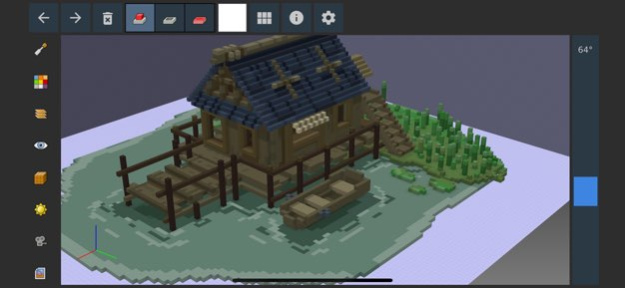
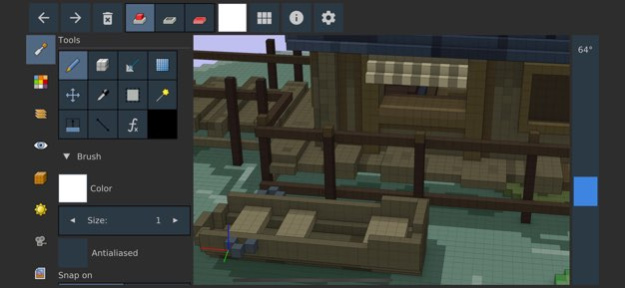
About Goxel 3D Voxel Editor
Goxel is a 3D program that lets you create voxel graphics. This is made by the creator of the free desktop version. Features: - 24 bits RGB colors. - Unlimited scene size. - Unlimited undo buffer. - Multiple layers...
Goxel is a 3D program that lets you create voxel graphics. This is made by the creator of the free desktop version. Features: - 24 bits RGB colors. - Unlimited scene size. - Unlimited undo buffer. - Multiple layers support. - Marching Cube rendering. - Procedural rendering. Please contact me for any bug report or suggestions.
Version History Minor update 1.15.3 12/13/2025 New version, that brings the iOS app in line with the desktop version - Improved selection tool - Reorganized user interface - Panels can now be moved - Improved glTF export - Many other minor changes 1.15.2 07/15/2025 Minor update to fix the file access when not using iCloud. 0.14.1 05/09/2024 - Improved the UI - Added layer mode - Better glTF export support - Better navigation 0.14.0 04/29/2024 - Removed the IAP purchases. All people who had the app installed get the full unlocked version. - Improved the export support. - Removed support for procedural tool: was hart to maintain and not many people actually used that. - A few other minor changes. 0.10.8 06/25/2022 - Improve iCloud support. - Minor improvements to the UI. 0.10.5 08/30/2019 Added: - Line tool. Changed: - Better plane tool: on click the plane move just before the clicked voxel for quick editing. The plane rendering has also been improved. - Slightly better looking grid effect. Fixed: - Fixed the behavior of snapping to always select the closest snapped point. - Fixed bug with selections on top of planes. 0.10.4 07/30/2019 - Fix bug with in app payment - Fix bug with layer merging 0.10.1 07/09/2019 - Add 'Magic Wand' tool. Allows to select adjacent voxels. - Show mirror axis on image box. - Don't stop background music from other application. 0.10.0 07/05/2019 This major release brings proper material support, and better pathtracing rendering. ### Added - Layer materials: each layer can now have its own material. - Transparent materials. - Emission materials. - Add new view settings. - Allow to scale a layer (only by factors of two). ### Changed - Marching cube rendering default to 'flat' colors. - Layer visibility is saved. - Materials now use metallic/roughness settings. 0.9.0 06/19/2019 - Add path tracing rendering. - Add shape layers. - Minor improvements in UI. - Better support for iPhone X notch. 0.8.3 04/10/2019 - Add option for shape tool to stay on the original plane. - Fix bug with selection tool. 0.8.2 11/19/2018 - Improve marching cube rending - Add some example models - Some minor fixes 0.8.1 09/17/2018 - Update UI - Fix some bugs - Support portrait orientation - A few other changes 0.8.0 07/03/2018 * Add support for iCloud storage * Can export marching cube wavefront * Some minor changes 0.7.2 02/26/2018 - Fix export on retina display - Add extrude tool - Minor fixes 0.7.1 08/17/2017 * Add clone layers. * Support moving layers by hand. * Add export to obj, ply, magica voxel, and qubicle. * Some improvements in the UI. 0.6.2 08/08/2017 * Try to fix In App Payment * Few minor changes 0.6.1 08/02/2017 0.6.0 07/31/2017
Previous Versions
Here you can find the changelog of Goxel 3D Voxel Editor since it was posted on our website on 2021-12-13 20:41:55.
The latest version is 1.15.3 and it was updated on 2026-10-13 16:25:05. See below the changes in each version.
Goxel 3D Voxel Editor version 1.15.3
Updated At: 2026-10-13
Changes: Version History Minor update 1.15.3 12/13/2025 New version, that brings the iOS app in line with the desktop version
- Improved selection tool
- Reorganized user interface
- Panels can now be moved
- Improved glTF export
- Many other minor changes 1.15.2 07/15/2025 Minor update to fix the file access when not using iCloud. 0.14.1 05/09/2024 - Improved the UI
- Added layer mode
- Better glTF export support
- Better navigation 0.14.0 04/29/2024 - Removed the IAP purchases. All people who had the app installed get the full unlocked version.
- Improved the export support.
- Removed support for procedural tool: was hart to maintain and not many people actually used that.
- A few other minor changes. 0.10.8 06/25/2022 - Improve iCloud support.
- Minor improvements to the UI. 0.10.5 08/30/2019 Added:
- Line tool.
Changed:
- Better plane tool: on click the plane move just before the clicked voxel for quick editing. The plane rendering has also been improved.
- Slightly better looking grid effect.
Fixed:
- Fixed the behavior of snapping to always select the closest snapped point.
- Fixed bug with selections on top of planes. 0.10.4 07/30/2019 - Fix bug with in app payment
- Fix bug with layer merging 0.10.1 07/09/2019 - Add 'Magic Wand' tool. Allows to select adjacent voxels.
- Show mirror axis on image box.
- Don't stop background music from other application. 0.10.0 07/05/2019 This major release brings proper material support, and better pathtracing
rendering.
### Added
- Layer materials: each layer can now have its own material.
- Transparent materials.
- Emission materials.
- Add new view settings.
- Allow to scale a layer (only by factors of two).
### Changed
- Marching cube rendering default to 'flat' colors.
- Layer visibility is saved.
- Materials now use metallic/roughness settings. 0.9.0 06/19/2019 - Add path tracing rendering.
- Add shape layers.
- Minor improvements in UI.
- Better support for iPhone X notch. 0.8.3 04/10/2019 - Add option for shape tool to stay on the original plane.
- Fix bug with selection tool. 0.8.2 11/19/2018 - Improve marching cube rending
- Add some example models
- Some minor fixes 0.8.1 09/17/2018 - Update UI
- Fix some bugs
- Support portrait orientation
- A few other changes 0.8.0 07/03/2018 * Add support for iCloud storage
* Can export marching cube wavefront
* Some minor changes 0.7.2 02/26/2018 - Fix export on retina display
- Add extrude tool
- Minor fixes 0.7.1 08/17/2017 * Add clone layers.
* Support moving layers by hand.
* Add export to obj, ply, magica voxel, and qubicle.
* Some improvements in the UI. 0.6.2 08/08/2017 * Try to fix In App Payment
* Few minor changes 0.6.1 08/02/2017 0.6.0 07/31/2017
Goxel 3D Voxel Editor version 1.15.3
Updated At: 2025-12-13
Changes: Minor update
Goxel 3D Voxel Editor version 1.15.2
Updated At: 2025-07-15
Changes: Jul 15, 2025
Version 1.15.2
New version, that brings the iOS app in line with the desktop version
- Improved selection tool
- Reorganized user interface
- Panels can now be moved
- Improved glTF export
- Many other minor changes
Goxel 3D Voxel Editor version 0.14.1
Updated At: 2024-05-09
Changes: May 9, 2024
Version 0.14.1
Minor update to fix the file access when not using iCloud.
Goxel 3D Voxel Editor version 0.14.0
Updated At: 2024-04-29
Changes: Apr 29, 2024
Version 0.14.0
- Improved the UI
- Added layer mode
- Better glTF export support
- Better navigation
Goxel 3D Voxel Editor version 0.10.8
Updated At: 2022-06-25
Changes: Jun 25, 2022 Version 0.10.8
- Removed the IAP purchases. All people who had the app installed get the full unlocked version.
- Improved the export support.
- Removed support for procedural tool: was hart to maintain and not many people actually used that.
- A few other minor changes.
Goxel 3D Voxel Editor version 0.10.5
Updated At: 2019-08-30
Changes: Aug 30, 2019 Version 0.10.5
- Improve iCloud support.
- Minor improvements to the UI.
Disclaimer
Official App Store Link
We do not host Goxel 3D Voxel Editor on our servers. We did not scan it for viruses, adware, spyware or other type of malware. This app is hosted by Apple and passed their terms and conditions to be listed there. We recommend caution when installing it.
The App Store link for Goxel 3D Voxel Editor is provided to you by apps112.com without any warranties, representations or guarantees of any kind, so access it at your own risk.
If you have questions regarding this particular app contact the publisher directly. For questions about the functionalities of apps112.com contact us.